

Microsoft Teams & Azure AD Access Packages = BFF ?! Hi, the more I am using Azure Active Directory Entitlement Management and Access Reviews, the more I am impressed by the possibilities of Identity Governance. The challenges which I am confronted with every day, these are especially Governance, Compliance...

Microsoft Teams & Azure AD Access Packages = BFF ?!
Hi,
the more I am using Azure Active Directory Entitlement Management and Access Reviews, the more I am impressed by the possibilities of Identity Governance. The challenges which I am confronted with every day, these are especially Governance, Compliance and Security Topics round about M365, have gotten a mighty opponent.
For those of you, who now think something like „Nah, Entitlement Management is an AAD P2 Feature, which is way too expensive“. It might be not as expensive as you think, but more about that later.
This article should show you a few use cases for Access Packages and give you some impressions about the functionalities.
So, what is it all about? Access Packages are an Azure Active Directory feature and a solution themed in the Category „Identity Governance“. An Access Package contains at least of an Access Catalog (which Resources do you want to handle) and one or more policies (which conditions shall apply for the access to the Resources).
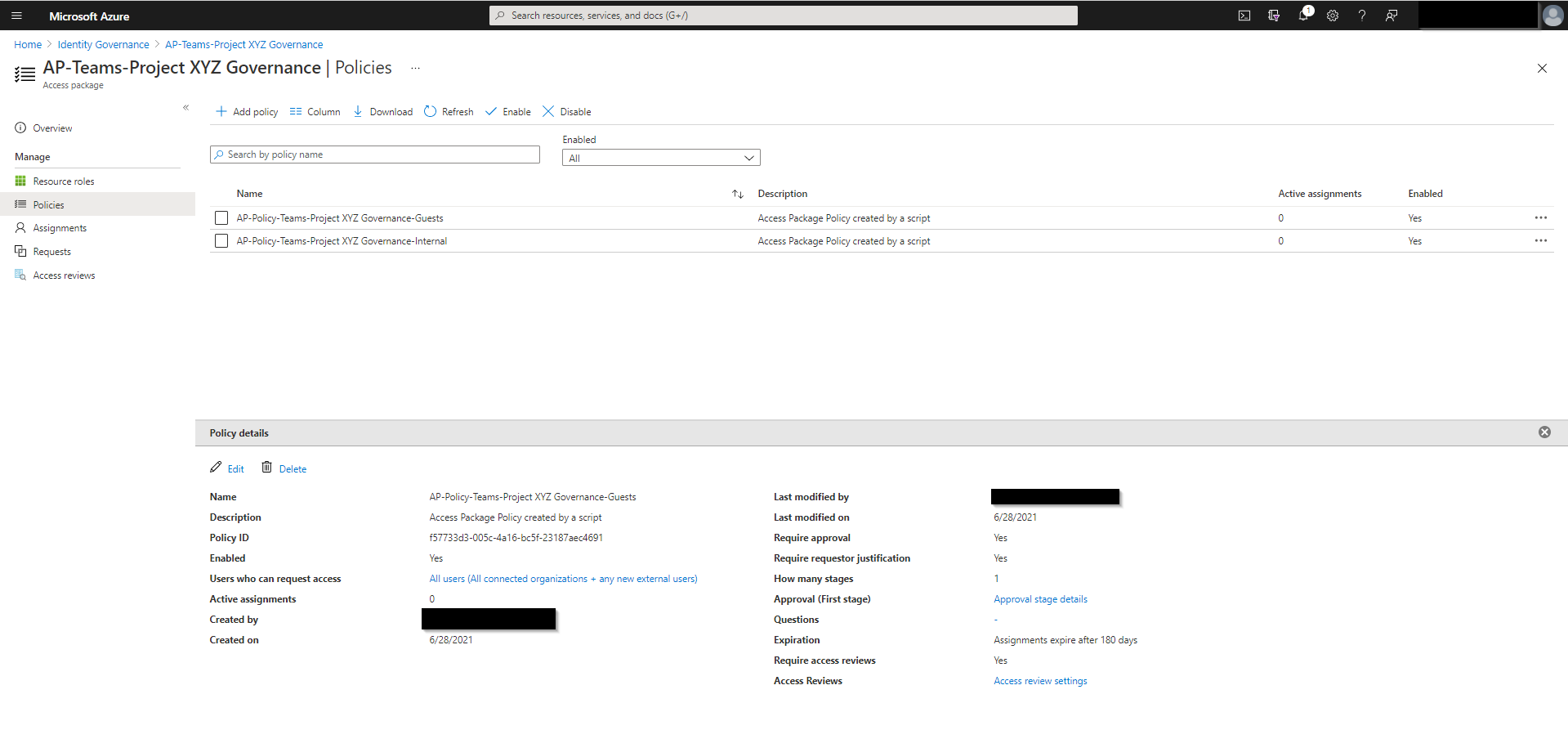
Example of an Access Package and it’s policies
Use Cases
Here are few Use Cases that you can utilize Access Packages for:
#1: Teams Guest only with approval: As you might know, the sharing possibilities in Microsoft Teams are manifold. And the effective Teams Sharing configuration is based on at least AAD & SPO & M365 Group & Teams Settings. With these Settings you can allow a Whitelist Approach for Guest Domains, deny Guest Invitations Access per M365 Group or prohibit Self Service Guest Invitations. If this is not granular enough for you, or want to implement an Approval Process for every single Guest, you can fulfil this requirement with Access Packages.
#2: Teams Guests with a second Stage foreign approval: We work a lot in projects for various customers. Most of them do not have Teams implemented yet. So one of the first steps is to create a Team for the Project and invite users from the customer and from other partners. Mostly we have signed some NDAs etc. To secure ourselves we want to include a responsible person from the customer in our Approval Process. The customer should pre-approve every guest member. Afterwards the Team owner should also approve the new member to be aware that there is a new member and onboard him. You can get this done with Access Packages.
#3: Recertify Teams memberships: You want to support the Team owners and users to keep their Team or rather their Teams Memberships clean. How often have you thought already: Do I still need to be a member in this team? Or why on earth is A.Person@anyForeignOrg.com still in this Team, they stopped working on this project weeks ago! But you have been too lazy to wipe out or to unsecure if you really can quit the membership right. What if there would be a tool which supports you to hygienitize these memberships? Surprise: There is one Feature for that, it’s called Access Packages, maybe supported by Access Reviews.
#4: Recertify Teams memberships II: Your org has a compliance team which is responsible for external access. They want to get an overview of all SharePoint Sites for departments they are responsible for and be able to recertify the guest memberships. Why don’t you check out Access Packages and Access Reviews? Both will support you to solve this challenge. The cherry on top: The reviewer also receives recommendations on how to handle the individual memberships.
#5: Build a smart Teams Inventory: You want to support your org by building an Teams Inventory. It should help your users to find Teams where they can harvest relevant information for their work, or where they can deliver some important input. Users should use the Inventory to request their access to the Team. Easy… Access Package Links paired with some informations collected by a flow will help you out.
#6: Do what the Name says: Build an Object that delivers all relevant resources for a User Profile (like a Teams Consultant, BackOffice Worker) and automatically provides users that fit in this profile with these resources. These resources can be Applications, Teams (or other M365 Group types) and SharePoint Sites. #AccessPackagesForTheWin
#7: Build a governed Self Service File Sharing platform management: You want to share potentially sensitive Data with dedicated partners and users. A Data Owner, who is a regular Business User, should be able to invite Members with different custom SharePoint Online Roles to request their self expiring permissions. Challenge accepted because we can use Access Packages.
#8: Combine all of the above. <EOF>
Usability
Sounds like a complex solution, right? Yeah, that’s true. But the good thing is that the user doesn’t see anything from this complexity. Here a few Screenshots of regular User Tasks, as you see it’s all based on a simple website mail.
Flow of an Access Package Request and Approval
Implementation
I’m a Teams Guy. Because I wanted to enable a bit more granularity in the Teams approval process, my Identity-focused colleague Chris mentioned that Access Packages might be a cool feature to reach my goal. Now I am fallen in love with them and maybe tend to escalate the usage of the access packages a bit :). But I hope that the one or other, which is reading this, maybe recognizes what’s the value of the Identity Governance Features and starts to play around with them.
Like all new Features in Azure & M365 the Entitlement Management is nearly completely manageable via the Microsoft Graph API. So, automation of the Access Packages deployment etc. is also very handy. Start your development for example by creating an „Template“ via the AAD Portal. When you have clicked through the configuration and defined & tested your process, you can e.g. use the Graph Explorer. to dump the configuration in a human readable JSON format. This output you can use to build for example a PowerShell script like this one. Build a few loops and if else statements etc. around the JSON to combine the force of PowerShell and Graph with the simplicity of the JSON Structure. Choose if you want to implement it in a Teams Deployment Process by using LogicApps and a PowerShell Runbook, or if you want to deploy the Access Packages lined by a csv as an administrative manually initiated task.
Licensing
Back to the sore spot: The pricing. Yes: It’s an AAD P2 Feature. So you have to supply every Azure AD User which is participating anyhow on the Entitlement Management, like:
Be able to Request an Access Package
Approve Access Package Requests
Process Access Reviews
… so literary everything.
BUT: Remember the AAD External Identities Model changes that were published in 2020. From that point of time (thank you for remembering us of this fact Jan Bakker with his Article) you can change the well known 1:5 ratio for LicensedMember:GuestUser, to „the first 50.000“ Guest Users were free… Yay!!! (Don’t mind the MFA costs in the sublines (https://azure.microsoft.com/en-us/pricing/details/active-directory/external-identities/), I’m sure you’re using the Authenticator App which generates no costs, because it’s cool).
What does this mean: If your primary use case is to approve and handle Guest Invitations, then you will come out with very very low licensing costs for the first 50.000 Guests. Only Reviewers and Approvers (Mostly the same) have to own a AAD P2 License. It’s great, isn’t it?
If you want to use this Features to also handle internal Resources with, yes, it could be expansive. But read the different use cases, adapt the methods and possibilities for your business. Then, I can imagine, you have good reasons to request these licenses for your organization.
Considerations
Ok ok… now, before you now deploy masses of Access Packages etc, calm down a and think about operation of the solution. There were still some open flanks, I have to admit. For example:
Access Management Assignment Management: There is already a role which allows authorized users to manage assignments to Access Packages. But unfortunately there is no user-friendly portal to manage it. You can lead your owners to the AAD Portal where they can manage the assignments of the Access Packages that they are authorized for, but I’m sure that a regular user will be confused using it. The good news is that the Azure AD Team is already working on a solution to integrate it into the MyAccess Portal.
Does anybody know if there is a more user friendly way to allow authorized users to proactively manage @azuread Access Package Assignments? To use the #AAD Portal is not very smart and Access Reviews are based on intervals. @debashis4u @joe_dadzie @andrescanello
— Jakob Schaefer - @JakobS@infosec.exchange (@Jak0b_S) June 22, 2021
E-Mail Notifications: Access Management uses mail to inform Requestors, Approvers and Reviewers. In my opinion these standardized notifications can annoying and it can lead to clutter in the user mailboxes. It would be nice if admins could manage the notification settings etc..
Non-assigned Memberships: You might want to prevent that users & guests can get access to the resources without having an Access Package assigned. That can be tricky. A way how to solve this for Teams is described in one of my last Articles about advanced Teams Governance.
Conclusion
In the end the users and data owners will get a toolset, build on native Microsoft solutions, which they can use nice and easy without waiting for the IT Staff to e.g. create the Guest User Account. The IT and compliance department will lick your boots because all the user can do is compliant to the rules of the business and regulatory requirements.
The fact that it’s „for free“ to manage external access with this solution is a welcome door opener to get used to the technology. Afterwards you can decide if you also want to use it for internal access management.