

In Focus
No items found.
thinformatics
Back to the blog
Allgemein
Exchange Online
Microsoft 365
Migrations
PowerShell

Tenant-to-Tenant – PST based Exchange Migration automation approach – Part V

This is the last article of my Exchange Online PST Migration automation approach. In the first parts we’ve reported the Mailbox Configuration, exported the mailbox content to PST’s, uploaded the PST’s and imported them into the destination mailboxes. So, the content migration is done now. Now, as a final...

Jakob Schaefer
Jakob Schaefer
Consultant & SME Team GRC[br]Governance, Risk & Compliance
December 27, 2022
5 Minuten
Reading time

This is the last article of my Exchange Online PST Migration automation approach. In the first parts we’ve reported the Mailbox Configuration, exported the mailbox content to PST’s, uploaded the PST’s and imported them into the destination mailboxes. So, the content migration is done now. Now, as a final step, I will show you a way and share the functions and scripts you can use to enrich our PST Migration with a downstream configuration migration.

I’ve already spoilered this in the first part of the series because the steps we’ve done there are the base of the reapplying I will show you today. We’ve used the cmdlet Export-Clixml in the source environment to report all the settings and configurations of named users. Now we use these XML-Files to reapply some of the configurations.

I don’t have the ambition to reapply every lit bit of the mailbox configuration, but the ones I will share with you are the ones with which I often deal in this or similar migration scenarios.

What you need

MappingTable: You need the PST Import Table which we’ve generated in the last part. It should contain a line for every mailbox that should be handled in the following script. We translate the Mailbox Access Entries etc from the Source Mailbox Settings using this table by finding the matching DestinationUserPrincipalName for our SourceUserPrincipalName.

Report Files: The Report XML-Files we’ve generated in the first part. They contain all the settings of the source mailboxes which we will reapply now. Maybe you want to refresh them now if you want to reapply the latest state.
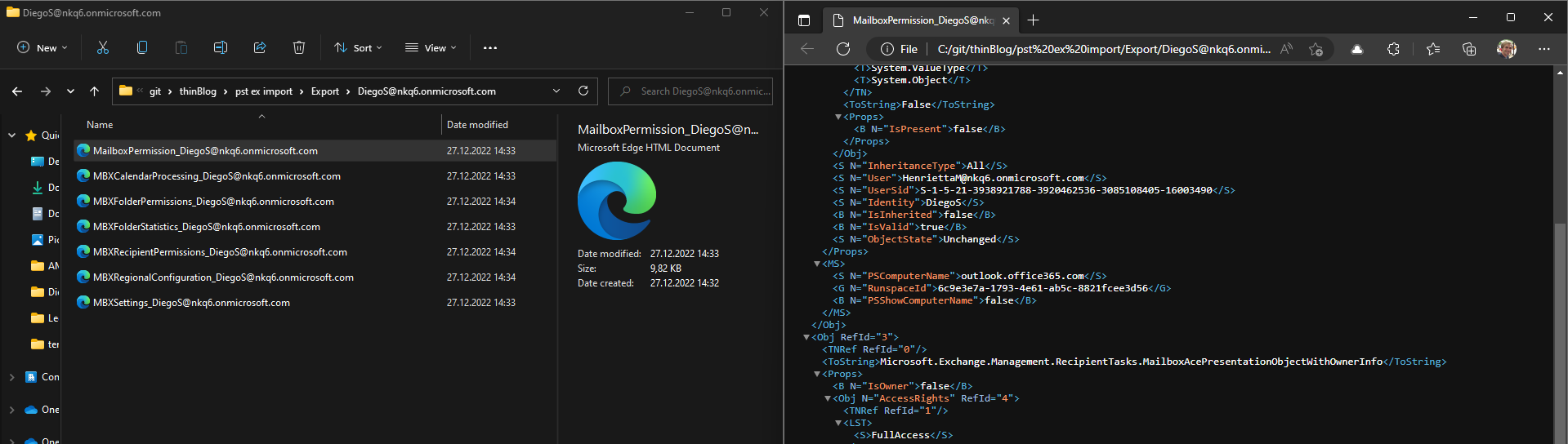
Reapply Settings

What I’ve already included within the shared script are functions for the following:

Mailbox Regional Settings (function reapply-mailboxRegionalSettings): We will replace the mailbox regional settings (Language, Timeformat, DateFormat & Timezone) of the mailbox in the destination with the regional settings of the source mailbox (MBXRegionalConfiguration_….XML). If no regional setting was defined in the source we apply a new default for the mailboxes.

Full Access Permissions (function reapply-fullAccessPermissions): We will check if there were full access permission for mailboxes defined in the MBXPermissions_….XML. If so we use the mapping table to find the counterpart of the permitted user within the destination environment and use this counterpart for a new permission-entry.

Send-As Permissions (function reapply-sendAsPermissions): Similar to the full access permissions. We will check the MBXRecipientPermissions_….XML for Send-As entries and reapply them.

Forwarding Settings (function reapplyMailboxForwardingSettings): If there were found configured mailbox forwarding settings (e.g. forward every mail to a delegate with inbox-copy to the original mailbox) they are stored in the MBXSettings_….XML.

MessageCopy Settings function (reapply-MailboxMessageCopyConfiguration): If an admin has configured e.g. all sent emails from a shared mailbox should be stored in the sent items if the shared mailbox, we reapply this setting also in the new environment. We read it out from the MBXSettings_….XML.

You can now download the following script from Github: thinBlog/Reapply-SettingsAndPermissions.ps1 at main · thinformatics/thinBlog (github.com). With that collection of functions, you will be able to loop through all mailboxes defined in the CSV and apply the „translated“ settings to the mailboxes in the destination.

To do so just replace the values for the report files and a transcript output path in the lines 1-6:
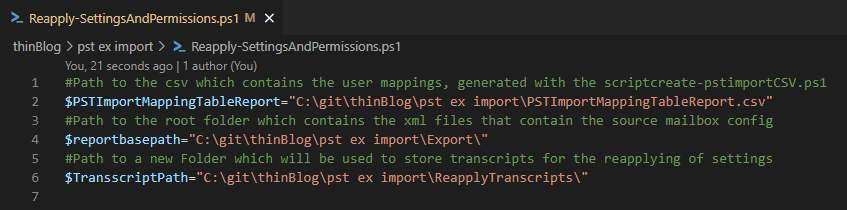
In lines 9-217 the functions were defined we use to reapply all the settings. If you need additional settings to be reapplied (like send on behalf, e-Mail Aliases …) you could easily copy a similar function here and adjust it to your needs.

It is all very straightforward. We import the relevant XML of the processed mailbox(, look up a counterpart using the mapping table,) and apply the settings from the XML to the new mailbox.

What you should do in every case is to review the default/failover mailbox regional settings which are defined in lines 28-40.

Now that the functions are defined we’re ready to use them. To do so I loop through the MappingTable CSV and start every defined function for every entry in the CSV. I use try/catch statements to do some error handling.

Furthermore, a transcript will be stored for every mailbox which contains the output for every task. You could use the transcript later if there have been issues in the reassignment.

The script also generates some output to let you know what is done right now. To debug stuff you could use the transcription logs.

You could reapply all settings as often as you want. Just export the settings from the source environment again and reapply them again. The settings will be overwritten with the actual values which were stored in the XML files. New Permission Entries will be added, but existing ones will not be touched.

Conclusion

That’s it! Let me repeat what I said in my first article of this series. I hope you can use the native T2T Migration Method that Microsoft offers (https://learn.microsoft.com/en-us/microsoft-365/enterprise/cross-tenant-mailbox-migration?view=o365-worldwide) to migrate Exchange Mailboxes and more from one Tenant to another.

But if there are circumstances that prevent you from doing it, and you need to fall back on a content-only migration like a PST Migration, then I think the might found the described methods useful. They can help you to optimize the migration performance and quality. With the last step, I’ve shared today you can also mitigate some of the migration pains which are primarily relevant to the end user. They will help you to reduce user frustration and keep your support calls lower.

manage-external-communications-in-teams
Manage external Communications in Teams
September 18, 2025
6 Minuten
Microsoft Teams
Security
Collaboration
Microsoft 365
ansatz-zum-behandeln-des-datenabflusses-bei-der-nutzung-von-m365-fr-sensible-accounts
Isolation von sensiblen Accounts in M365
January 9, 2025
10 Minuten
Identity
Security
Enterprise
Compliance
SSE
GSA
export-archiv-mailbox-content-using-ediscovery
Export Exchange Online Archiv Mailbox content using eDiscovery
September 6, 2024
6 Minuten
Compliance
Microsoft Purview
Export
Exchange Online
Archiving
PowerShell
cloning-entra-cloud-sync-jobs
Cloning Entra Cloud Sync Jobs
May 6, 2024
7 Minuten
Entra ID
PowerShell
Cloud Sync
Hybrid
Microsoft Graph API
entra-cloud-sync-group-provisioning-mappings
Entra Cloud Sync - Group Provisioning
February 21, 2024
6 Minuten
Entra ID
Active Directory
Hybrid
Identity
TIL
do-more-with-less-or-do-less-with-more
“Do more with less” or „Do less with more“?
January 10, 2024
8 Minuten
Allgemein
wie-wandle-ich-meine-sharepoint-liste-in-eine-mini-app
Wie wandle ich meine SharePoint-Liste in eine Mini-APP
July 31, 2023
4 Minuten
Citizen Development
Lists
SharePoint
shared-channels-in-microsoft-teams
Shared Channels in Microsoft Teams: So bringen wir unsere Unternehmensgruppe zusammen
April 24, 2023
7 Minuten
Allgemein
Microsoft 365
User Adoption
Entra ID
Security
Microsoft Teams
datengetriebenes-change-management
Datengetriebenes Change Management? Analyse von Nutzungszahlen und deren Aussagekraft bei der Erfolgsmessung der Digitalisierung und User Adoption
April 13, 2023
8 Minuten
Change Management
Messbarkeit
teams-inventory-implement-membership-requests
Teams Inventory – Implement Membership Requests
March 1, 2023
5 Minuten
Allgemein
Governance
Microsoft 365
Power Automate
Power Platform
SharePoint
Microsoft Teams
how-to-build-a-simple-teams-inventory
How to build a simple Teams Inventory
February 17, 2023
9 Minuten
Logic Apps
update-power-automate-dein-day-summary-flow
Update: Power Automate: Dein „Day Summary“-Flow
February 1, 2023
2 Minuten
Citizen Development
Power Automate
power-automate-dein-day-summary-flow
Power Automate: Dein „Day Summary“-Flow
January 4, 2023
2 Minuten
Citizen Development
Power Automate
tenant-to-tenant-pst-based-exchange-migration-automation-approach-part-v
Tenant-to-Tenant – PST based Exchange Migration automation approach – Part V
December 27, 2022
5 Minuten
Allgemein
Exchange Online
Microsoft 365
Migrations
PowerShell
tenant-to-tenant-pst-based-exchange-migration-automation-approach-part-iv
Tenant-to-Tenant – PST based Exchange Migration automation approach – Part IV
November 30, 2022
5 Minuten
Allgemein
Exchange Online
Microsoft 365
Migrations
PowerShell
tenant-to-tenant-pst-based-exchange-migration-automation-approach-part-iii
Tenant-to-Tenant – PST based Exchange Migration automation approach – Part III
November 25, 2022
4 Minuten
Allgemein
Azure
Exchange Online
Microsoft 365
Migrations
PowerShell
tenant-to-tenant-pst-based-exchange-migration-automation-approach-part-ii
Tenant-to-Tenant – PST based Exchange Migration automation approach – Part II
November 18, 2022
5 Minuten
Allgemein
Compliance
Exchange Online
Microsoft 365
Microsoft Purview
Migrations
PowerShell
tenant-to-tenant-pst-based-exchange-migration-automation-approach-part-i
Tenant-to-Tenant – PST based Exchange Migration automation approach – Part I
November 16, 2022
5 Minuten
Allgemein
Compliance
Exchange Online
Microsoft 365
Microsoft Purview
Migrations
PowerShell
ignite-impressionen-was-ist-neu-in-microsoft-viva
Ignite Impressionen: Was ist neu in Microsoft Viva?
October 28, 2022
5 Minuten
Employee Experience
ignite-impressionen-summary-und-persoenliches-fazit
Ignite Impressionen: Summary und persönliches Fazit zur Session „Microsoft To Do is good for your mental health!“
October 28, 2022
5 Minuten
Allgemein
Microsoft 365
Planner
To Do
ignite-impressionen-microsoft-entra-workload-identities
Ignite Impressionen: Microsoft Entra Workload Identities
October 28, 2022
4 Minuten
Microsoft 365
Entra ID
Conditional Access
Identity
Identity Governance
Identity Protection
ignite-impressionen-microsoft-syntex-die-freundliche-ki-von-nebenan
Ignite Impressionen: Microsoft Syntex – die freundliche KI von nebenan
October 28, 2022
3 Minuten
Allgemein
Microsoft 365
Governance
Information Governance
Power Automate
Power Platform
SharePoint
ignite-impressionen-uebersetzung-mit-ai-builder
Ignite Impressionen: Übersetzung mit AI Builder
October 28, 2022
3 Minuten
Allgemein
Microsoft 365
Citizen Development
Power Automate
Power Platform
SharePoint
how-to-retain-exchange-online-content-an-overview-of-the-different-compliance-options-in-microsoft-365
How to retain Exchange Online content – An overview of the different compliance options in Microsoft 365
September 28, 2022
10 Minuten
Archiving
Compliance
Governance
Retention
azure-ad-guest-governance-automation
Azure AD Guest Governance Automation
August 16, 2022
6 Minuten
Governance
Log Analytics
Logic Apps
assign-teams-app-permission-policies-to-groups
Assign Teams app permission policies to Groups(-Members)
July 1, 2022
8 Minuten
Allgemein
Microsoft 365
Governance
PowerShell
Microsoft Teams
powerautomate-prozente-in-einer-html-tabelle
PowerAutomate: Prozente in einer HTML-Tabelle
May 30, 2022
2 Minuten
Citizen Development
planner-e-mail-report-mit-aufgaben-gruppiert-nach-bucket
Planner E-Mail-Report mit Aufgaben gruppiert nach Bucket
March 31, 2022
3 Minuten
Citizen Development
sharepoint-liste-als-e-mail-uebersicht-mit-personen-feldern-und-odata-meistern
SharePoint-Liste als E-Mail-Übersicht mit Personen-Feldern (und OData meistern)
March 29, 2022
2 Minuten
Citizen Development
Power Automate
use-graph-directory-schema-extensions-for-microsoft-teams-governance
Use Graph Directory Schema Extensions for Microsoft Teams Governance
October 15, 2021
9 Minuten
Microsoft Graph API
teams-invitation-processes-a-comparison
Teams Invitation Processes - A comparison
July 8, 2021
6 Minuten
Access Packages
Compliance
Entitlement Management
Governance
Microsoft Teams
Security
use-more-access-packages
Use more Access Packages!
June 28, 2021
8 Minuten
Access Packages
Identity Governance
Compliance
Governance
Security
Microsoft Teams
microsoft-teams-fulfill-advanced-guest-access-requirements
Microsoft Teams – Fulfill Advanced Guest Access Requirements
December 4, 2020
6 Minuten
Allgemein
Entra ID
Governance
Identity Governance
Microsoft 365
Microsoft Teams
microsoft-365-language-confusion
Microsoft 365 – Language Confusion
September 30, 2020
12 Minuten
Language
another-microsoft-teams-governance-approach-using-azure-ad-identity-governance
Another Microsoft Teams Governance Approach – Using Azure AD Identity Governance
September 18, 2020
21 Minuten
Governance
Identity Governance
Microsoft Teams
planner-migration-tenant-to-tenant
Planner Migration Tenant to Tenant
July 9, 2020
3 Minuten
Migrations
Planner
PowerShell
Tenant to Tenant
flow-instant-raumbuchung
Flow: Instant Raumbuchung
February 25, 2020
2 Minuten
Citizen Development
Power Automate
ai-integrations
ai-solutions
ai-applications
ai-solutions
intranet-solutions
digital-workplace
endpoint-security
security
compliance-regulatorik
security-compliance-zero-trust
plattform-engineering
cloud-plattformen-engineering
endpoint-management-2
workplace
ai-assistants
ai-solutions
cloud-security
security-compliance-zero-trust
cloud-transformation
cloud-strategie-architektur
system-integration
intelligence-automation
business-applications
custom-software
identity-security
security
container-platforms
platform
employee-experience
modern-workplace
collaboration-productivity
modern-workplace
transformation-management
cloud-transformation
application-modernization
cloud-transformation
cloud-governance-und-betriebsmodell
cloud-strategie-architektur
workflow-automation
intelligence-automation
sharepoint-solutions
digital-workplace
security-monitoring
security
collaboration-platforms
workplace
cloud-platforms
platform
virtualization-operations
infrastructure
server-operations
infrastructure
ai-security-compliance
ai-digital-innovation
endpoint-management
modern-workplace
cyber-resillience
security-compliance-zero-trust
identity-access
security-compliance-zero-trust
change-enablement
cloud-transformation
workload-modernization
cloud-transformation
plattformautomatisierung
cloud-plattformen-engineering
hybrid-connectivity
cloud-plattformen-engineering
landing-zones
cloud-plattformen-engineering
business-process-automation
intelligence-automation
microsoft-365-extensions
digital-workplace
apis-integrationen
custom-software
web-applications
custom-software
ai-for-modern-workplace
ai-digital-innovation
aitransformation-adoption
ai-digital-innovation
ai-platforms-engineering
ai-digital-innovation
ai-strategie-und-governance
ai-digital-innovation
workplace-security
modern-workplace
zero-trust
security-compliance-zero-trust
cloud-migration
cloud-transformation
cloud-foundations
cloud-plattformen-engineering
cloud-assesments
cloud-strategie-architektur
hybrid--multi-cloud-strategie
cloud-strategie-architektur
modern-work-adoption
modern-workplace
hybrid--multi-cloud-architektur
cloud-strategie-architektur