

In Focus
No items found.
thinformatics
Back to the blog
Allgemein
Governance
Microsoft 365
Power Automate
Power Platform
SharePoint
Microsoft Teams

Teams Inventory – Implement Membership Requests

Recently I published a blog article where I describe a way how to create your own Teams Inventory with native M365 features: https://blog.thinformatics.com/2023/02/how-to-build-a-simple-teams-inventory. Today I share an example of implementing Teams membership join requests into this solution. The users...

Jakob Schaefer
Jakob Schaefer
Consultant & SME Team GRC[br]Governance, Risk & Compliance
March 1, 2023
5 Minuten
Reading time

Recently I published a blog article where I describe a way how to create your own Teams Inventory with native M365 features: https://blog.thinformatics.com/2023/02/how-to-build-a-simple-teams-inventory.

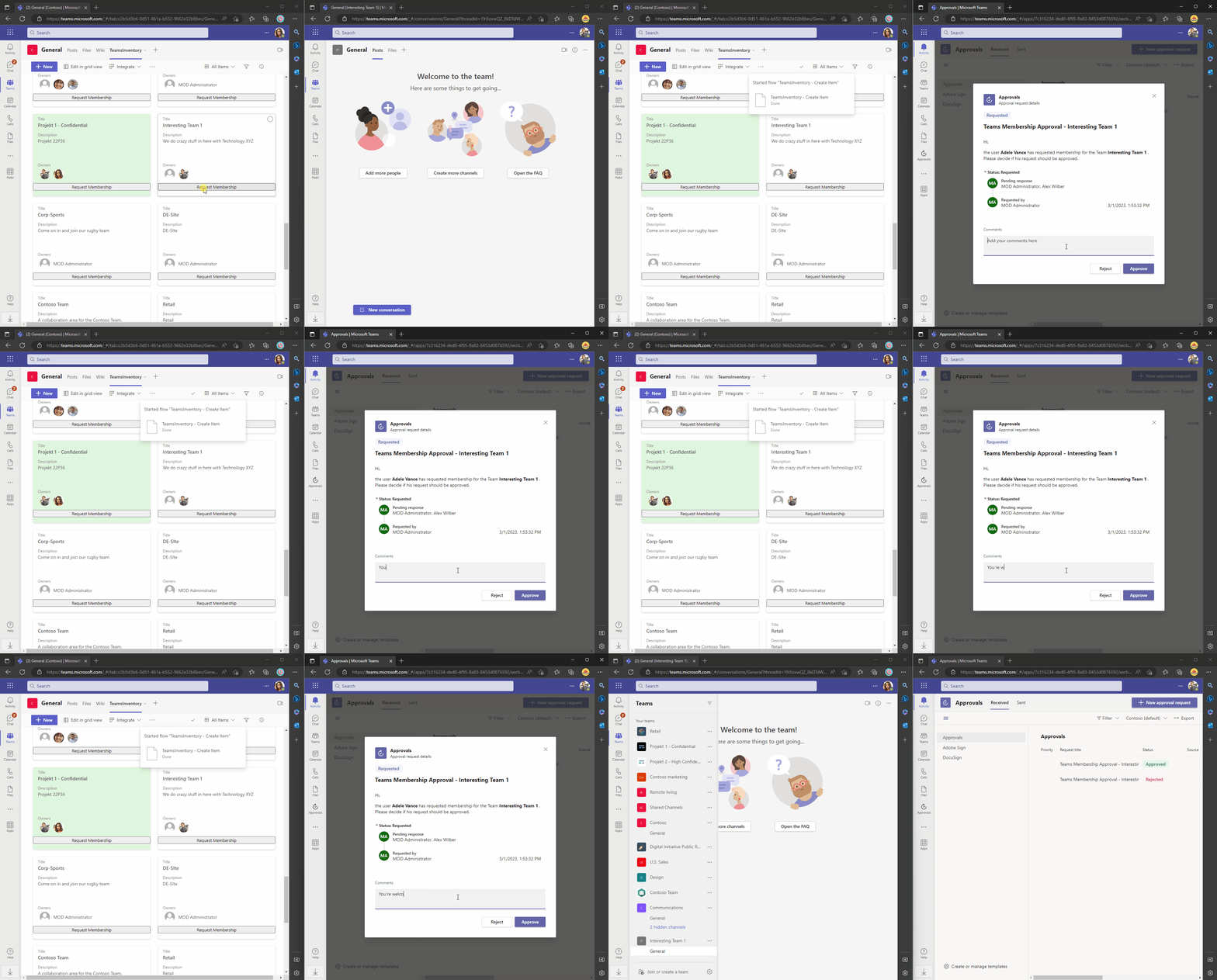
Today I share an example of implementing Teams membership join requests into this solution. The users of your Teams Inventory will be able to request the membership of every listed Team afterward. The Team Owners will be asked for their approval. Again, we use simple tools to get it done.

The process will look somehow like this for the end users:
How to get there?

Here is a short explanation of what we will build today: We will create a Power Automate Flow that can be triggered by users, using the inventory. This helper-flow will create an Approval Item in a separate SharePoint List. This Item will trigger another Power Automate Flow. That Flow will start an approval for the Teams Owners to let them process the approval request. When the owner has approved the membership request, the requesting user will be added to the Team.

Create the Approval List

First, we need to create a List that will contain all membership requests of the users. We create the list in the same site as the inventory. I’ve chosen the Name ‚Approvals‘. I removed the list from the quick launch cause it’s not relevant for the end users. Furthermore, I configured the Item Level Permissions for the new list to only list that the users can only see their own membership requests.

The columns we need for the following are:

GroupID (Text): This ID will contain the ID of the group for which a user requested access

RequestingUser (Person): This column will contain the userobject of the requesting user

Status (Choice): This Column will contain the actual status of the membership request. Provide the following choices: ‚Requested‘, ‚Processing‘, and ‚Processed‘

Result (Choice): This Column will contain the outcome of the approval. Provide the following choices: ‚Approve‘ and ‚Deny‘

Create the helper Flow

To let the users request their access we will create a flow that can be triggered by everyone using the inventory List. The flow is pretty simple.

The trigger action is ‚For a selected item‘ and is scoped to the Inventory List:

Then I’ve defined some vars with the URL and the ListID’s (Perhaps a little exaggerated here, but it’s good to get used to it).

Then we fetch the details of the membership request trigger and create an item for it in the approvals list. The item will contain the email address of the requesting user, the groupID of the Team where the access was requested, and the initial Status ‚Requested‘.

Save the flow and make it „trigger“-able for the inventory users by adding the inventory list as a ‚Run only user‘ of the flow. Assure that the connection of the run-only user is used.

Here you can download the import Ready-Flow: thinBlog/TI-CreateApprovalItem.zip at main · thinformatics/thinBlog (github.com)

Integrate the helper Flow into the inventory List

Next, we need to implement a trigger option for the helper-flow into the inventory list. You can use the standard context-menu method to trigger the flow with a list item, or you update the tile-view formatting to contain a trigger button.

I share the schema here: thinBlog/TeamsInventoryTileViewSchema.json at main · thinformatics/thinBlog (github.com). The relevant part is the button formatting. Insert these lines into the childs section of the schema JSON. The id in the actionParams Value is the ID of the HelperFlow you’ve created before. You can find it when you edit the flow and extract it from the URL

{

"elmType": "button",

"txtContent": "Request Membership",

"customRowAction": {

"action": "executeFlow",

"actionParams": "{\"id\": \"328d5d0a-1b84-4451-ae46-625a02917846\"}"

}

}

Now you and other TeamInventory Users should be able to request the Teams Membership:

Draw the rest of the f*** owl

Ok, nice… The Membership request is now implemented. But we also want approval right? To get the approval done and process the request accordingly we will create another flow.

The flow connections need to use an identity that has a license for Dataverse (approvals are based on it) included. Furthermore, the user needs Permission to edit Group Memberships. This is not a setting that I like very much, but the effort to do the same with managed identities, etc. in Logic Apps is way higher and not easy to explain in this format.

Create the Flow now by starting with the SharePoint Trigger ‚When an item is created or modified‘ and scope it for the Approvals List

Go to the settings of the trigger and implement this trigger condition to avoid false trigger events. Only Items where the Status Value equals ‚Requested‘ will trigger the Flow

@equals(triggerBody()?['Status']?['Value'],'Requested')

Then define the variables as follows:

Now we want to start an approval that is targeted to the related Team owners. Cause we cannot guarantee that the Inventory List is up to date, we fetch the owners first by sending an HTTP Graph request to the Group using the Office 365 Group Connector (which is not a Premium Connector like the regular HTTP Connector).

To be able to include the Team displayName and more in the approval Task we fetch additional Team Information additionally.

Next, we fill up our TeamsOwnerString variable with the list of the UPN’s of the Teams Owners.

With that information, we can start the approval (and wait for the results)

I’ve disabled the reassignment feature cause we’ve already targeted all valid Team Owners.

Now we just need to react to the approval outcome and add the requesting User when the result equals ‚Approve‘. We use the Office365 Group Connector for this again. You maybe want to add a notification here in the ‚If no‘ section to inform the requesting user accordingly.

The last step is to update the Item in the approval list. You can add some more metadata like the approval justification or the approver name additionally by adding corresponding columns to the list and adding the values here.

That’s it. Now your Teams Inventory can also be used to request Teams Memberships!

Here you have an export of the Flow if you’re struggling with the implementation: thinBlog/TI-ProcessMembershipRequest.zip at main · thinformatics/thinBlog (github.com)

What else?!

I will explain a method to hide some Teams from the inventory sometime. What else would you expect from a Teams inventory?

manage-external-communications-in-teams
Manage external Communications in Teams
September 18, 2025
6 Minuten
Microsoft Teams
Security
Collaboration
Microsoft 365
ansatz-zum-behandeln-des-datenabflusses-bei-der-nutzung-von-m365-fr-sensible-accounts
Isolation von sensiblen Accounts in M365
January 9, 2025
10 Minuten
Identity
Security
Enterprise
Compliance
SSE
GSA
export-archiv-mailbox-content-using-ediscovery
Export Exchange Online Archiv Mailbox content using eDiscovery
September 6, 2024
6 Minuten
Compliance
Microsoft Purview
Export
Exchange Online
Archiving
PowerShell
cloning-entra-cloud-sync-jobs
Cloning Entra Cloud Sync Jobs
May 6, 2024
7 Minuten
Entra ID
PowerShell
Cloud Sync
Hybrid
Microsoft Graph API
entra-cloud-sync-group-provisioning-mappings
Entra Cloud Sync - Group Provisioning
February 21, 2024
6 Minuten
Entra ID
Active Directory
Hybrid
Identity
TIL
do-more-with-less-or-do-less-with-more
“Do more with less” or „Do less with more“?
January 10, 2024
8 Minuten
Allgemein
wie-wandle-ich-meine-sharepoint-liste-in-eine-mini-app
Wie wandle ich meine SharePoint-Liste in eine Mini-APP
July 31, 2023
4 Minuten
Citizen Development
Lists
SharePoint
shared-channels-in-microsoft-teams
Shared Channels in Microsoft Teams: So bringen wir unsere Unternehmensgruppe zusammen
April 24, 2023
7 Minuten
Allgemein
Microsoft 365
User Adoption
Entra ID
Security
Microsoft Teams
datengetriebenes-change-management
Datengetriebenes Change Management? Analyse von Nutzungszahlen und deren Aussagekraft bei der Erfolgsmessung der Digitalisierung und User Adoption
April 13, 2023
8 Minuten
Change Management
Messbarkeit
teams-inventory-implement-membership-requests
Teams Inventory – Implement Membership Requests
March 1, 2023
5 Minuten
Allgemein
Governance
Microsoft 365
Power Automate
Power Platform
SharePoint
Microsoft Teams
how-to-build-a-simple-teams-inventory
How to build a simple Teams Inventory
February 17, 2023
9 Minuten
Logic Apps
update-power-automate-dein-day-summary-flow
Update: Power Automate: Dein „Day Summary“-Flow
February 1, 2023
2 Minuten
Citizen Development
Power Automate
power-automate-dein-day-summary-flow
Power Automate: Dein „Day Summary“-Flow
January 4, 2023
2 Minuten
Citizen Development
Power Automate
tenant-to-tenant-pst-based-exchange-migration-automation-approach-part-v
Tenant-to-Tenant – PST based Exchange Migration automation approach – Part V
December 27, 2022
5 Minuten
Allgemein
Exchange Online
Microsoft 365
Migrations
PowerShell
tenant-to-tenant-pst-based-exchange-migration-automation-approach-part-iv
Tenant-to-Tenant – PST based Exchange Migration automation approach – Part IV
November 30, 2022
5 Minuten
Allgemein
Exchange Online
Microsoft 365
Migrations
PowerShell
tenant-to-tenant-pst-based-exchange-migration-automation-approach-part-iii
Tenant-to-Tenant – PST based Exchange Migration automation approach – Part III
November 25, 2022
4 Minuten
Allgemein
Azure
Exchange Online
Microsoft 365
Migrations
PowerShell
tenant-to-tenant-pst-based-exchange-migration-automation-approach-part-ii
Tenant-to-Tenant – PST based Exchange Migration automation approach – Part II
November 18, 2022
5 Minuten
Allgemein
Compliance
Exchange Online
Microsoft 365
Microsoft Purview
Migrations
PowerShell
tenant-to-tenant-pst-based-exchange-migration-automation-approach-part-i
Tenant-to-Tenant – PST based Exchange Migration automation approach – Part I
November 16, 2022
5 Minuten
Allgemein
Compliance
Exchange Online
Microsoft 365
Microsoft Purview
Migrations
PowerShell
ignite-impressionen-was-ist-neu-in-microsoft-viva
Ignite Impressionen: Was ist neu in Microsoft Viva?
October 28, 2022
5 Minuten
Employee Experience
ignite-impressionen-summary-und-persoenliches-fazit
Ignite Impressionen: Summary und persönliches Fazit zur Session „Microsoft To Do is good for your mental health!“
October 28, 2022
5 Minuten
Allgemein
Microsoft 365
Planner
To Do
ignite-impressionen-microsoft-entra-workload-identities
Ignite Impressionen: Microsoft Entra Workload Identities
October 28, 2022
4 Minuten
Microsoft 365
Entra ID
Conditional Access
Identity
Identity Governance
Identity Protection
ignite-impressionen-microsoft-syntex-die-freundliche-ki-von-nebenan
Ignite Impressionen: Microsoft Syntex – die freundliche KI von nebenan
October 28, 2022
3 Minuten
Allgemein
Microsoft 365
Governance
Information Governance
Power Automate
Power Platform
SharePoint
ignite-impressionen-uebersetzung-mit-ai-builder
Ignite Impressionen: Übersetzung mit AI Builder
October 28, 2022
3 Minuten
Allgemein
Microsoft 365
Citizen Development
Power Automate
Power Platform
SharePoint
how-to-retain-exchange-online-content-an-overview-of-the-different-compliance-options-in-microsoft-365
How to retain Exchange Online content – An overview of the different compliance options in Microsoft 365
September 28, 2022
10 Minuten
Archiving
Compliance
Governance
Retention
azure-ad-guest-governance-automation
Azure AD Guest Governance Automation
August 16, 2022
6 Minuten
Governance
Log Analytics
Logic Apps
assign-teams-app-permission-policies-to-groups
Assign Teams app permission policies to Groups(-Members)
July 1, 2022
8 Minuten
Allgemein
Microsoft 365
Governance
PowerShell
Microsoft Teams
powerautomate-prozente-in-einer-html-tabelle
PowerAutomate: Prozente in einer HTML-Tabelle
May 30, 2022
2 Minuten
Citizen Development
planner-e-mail-report-mit-aufgaben-gruppiert-nach-bucket
Planner E-Mail-Report mit Aufgaben gruppiert nach Bucket
March 31, 2022
3 Minuten
Citizen Development
sharepoint-liste-als-e-mail-uebersicht-mit-personen-feldern-und-odata-meistern
SharePoint-Liste als E-Mail-Übersicht mit Personen-Feldern (und OData meistern)
March 29, 2022
2 Minuten
Citizen Development
Power Automate
use-graph-directory-schema-extensions-for-microsoft-teams-governance
Use Graph Directory Schema Extensions for Microsoft Teams Governance
October 15, 2021
9 Minuten
Microsoft Graph API
teams-invitation-processes-a-comparison
Teams Invitation Processes - A comparison
July 8, 2021
6 Minuten
Access Packages
Compliance
Entitlement Management
Governance
Microsoft Teams
Security
use-more-access-packages
Use more Access Packages!
June 28, 2021
8 Minuten
Access Packages
Identity Governance
Compliance
Governance
Security
Microsoft Teams
microsoft-teams-fulfill-advanced-guest-access-requirements
Microsoft Teams – Fulfill Advanced Guest Access Requirements
December 4, 2020
6 Minuten
Allgemein
Entra ID
Governance
Identity Governance
Microsoft 365
Microsoft Teams
microsoft-365-language-confusion
Microsoft 365 – Language Confusion
September 30, 2020
12 Minuten
Language
another-microsoft-teams-governance-approach-using-azure-ad-identity-governance
Another Microsoft Teams Governance Approach – Using Azure AD Identity Governance
September 18, 2020
21 Minuten
Governance
Identity Governance
Microsoft Teams
planner-migration-tenant-to-tenant
Planner Migration Tenant to Tenant
July 9, 2020
3 Minuten
Migrations
Planner
PowerShell
Tenant to Tenant
flow-instant-raumbuchung
Flow: Instant Raumbuchung
February 25, 2020
2 Minuten
Citizen Development
Power Automate
ai-integrations
ai-solutions
ai-applications
ai-solutions
intranet-solutions
digital-workplace
endpoint-security
security
compliance-regulatorik
security-compliance-zero-trust
plattform-engineering
cloud-plattformen-engineering
endpoint-management-2
workplace
ai-assistants
ai-solutions
cloud-security
security-compliance-zero-trust
cloud-transformation
cloud-strategie-architektur
system-integration
intelligence-automation
business-applications
custom-software
identity-security
security
container-platforms
platform
employee-experience
modern-workplace
collaboration-productivity
modern-workplace
transformation-management
cloud-transformation
application-modernization
cloud-transformation
cloud-governance-und-betriebsmodell
cloud-strategie-architektur
workflow-automation
intelligence-automation
sharepoint-solutions
digital-workplace
security-monitoring
security
collaboration-platforms
workplace
cloud-platforms
platform
virtualization-operations
infrastructure
server-operations
infrastructure
ai-security-compliance
ai-digital-innovation
endpoint-management
modern-workplace
cyber-resillience
security-compliance-zero-trust
identity-access
security-compliance-zero-trust
change-enablement
cloud-transformation
workload-modernization
cloud-transformation
plattformautomatisierung
cloud-plattformen-engineering
hybrid-connectivity
cloud-plattformen-engineering
landing-zones
cloud-plattformen-engineering
business-process-automation
intelligence-automation
microsoft-365-extensions
digital-workplace
apis-integrationen
custom-software
web-applications
custom-software
ai-for-modern-workplace
ai-digital-innovation
aitransformation-adoption
ai-digital-innovation
ai-platforms-engineering
ai-digital-innovation
ai-strategie-und-governance
ai-digital-innovation
workplace-security
modern-workplace
zero-trust
security-compliance-zero-trust
cloud-migration
cloud-transformation
cloud-foundations
cloud-plattformen-engineering
cloud-assesments
cloud-strategie-architektur
hybrid--multi-cloud-strategie
cloud-strategie-architektur
modern-work-adoption
modern-workplace
hybrid--multi-cloud-architektur
cloud-strategie-architektur