

In Microsoft Teams you have to manage a bunch of different policies. Right now I count 13 different policies that were available to assign them to Teams Users. Teams Policies manage how users are able to use the Teams Service. Luckily there are – meanwhile – possibilities to assign these policies based...

In Microsoft Teams you have to manage a bunch of different policies. Right now I count 13 different policies that were available to assign them to Teams Users. Teams Policies manage how users are able to use the Teams Service.
Luckily there are – meanwhile – possibilities to assign these policies based on AD Groups. You could use Policy Packages which can be configured using the Teams Admin Center, or you could use the Skype Powershell, which is included in the PowerShell Module for Teams, and the included command New-CSGroupPolicyAssignment. Both options are valid and do their job as expected. Unfortunately, both only support a subset of the policies which were used for Teams user management.
This table summarizes the coverage of policy types per method:
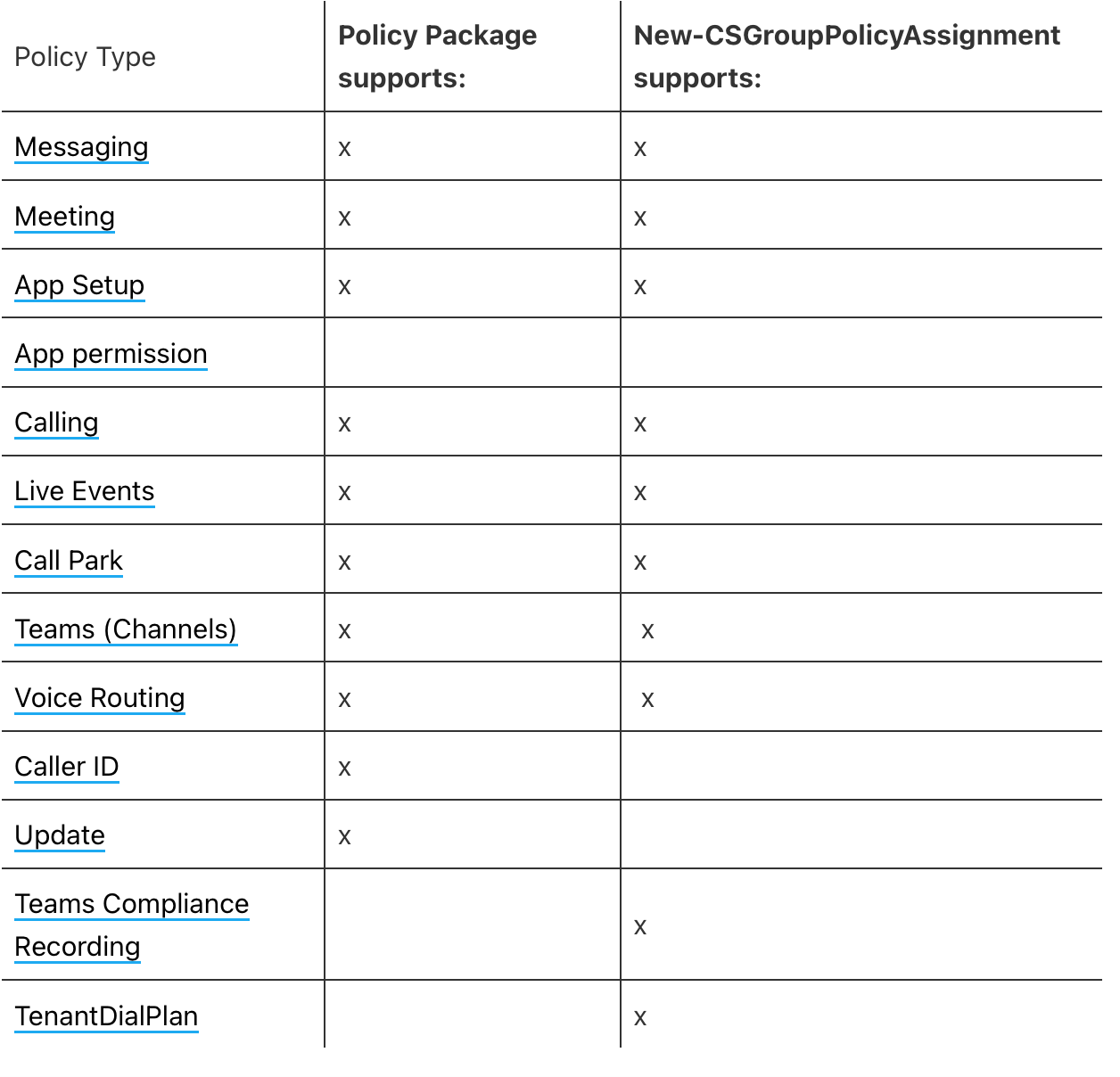
Comparison of supported Methods to assign policies based on groups
You may have mentioned that there is one policy type listed that can not be assigned with neither of the mentioned methods. That fact and a workaround is what this blog article is about.
App Permission Policy – why use it?
The app permission policy defines which Teams apps are available for which user. There are org-wide settings that you can use to manage which apps are available and which are not for the whole Teams organization, but if you need more granular management of the apps you can handle it with app permission policies.
Org wide App Settings
In a perfect world, we maybe could allow all our users to use every app that is published in the Teams app store, but in real life at least in bigger environments, you need to be able to limit the available apps. A reason for a limitation of apps could be e.g. some regulatory requirements or data protection concerns in some user-regions. Another one could be an ongoing Teams implementation where you do not want to overload users and want to roll out specific apps in phases.
A Workaround – comprehensive description
So, if you need to assign app protection policies to a bunch of users, and the bunches (Groups) were regrouped often, you need some way to deal with it. A manual assignment based on the TAC is not a valid solution, because in bigger organizations the masses of users and the changes of departments etc. are a way too challenging to get this done. So we need any kind of tool which helps us to get it done. Here comes the PowerShell and a batch job into the game. We can use the Teams PowerShell (ok, it’s more Skype than Teams) to assign these policies in bulk. With the command Grant-CSTeamsAppPermissionPolicy we can assign the policy to a user. And because PowerShell also can make use of loops, we can also assign the policy to the whole bunch of users.
Cause the main topic of a non-group based policy assignment persists (repeated changes of memberships), we need to get this job done repeatedly to provide the users with the right policy according to their group membership. Ok no problem, we can repeat a PowerShell Script as often as we want.
While writing this article the idea came up to use the AAD Audit Logs and Log Analytics to react with a policy assignment script when a user receives or loses a group membership. Maybe I will write a follow-up showing this method.
If you know other blog articles from me you know that I prefer using the Graph instead of any additional (to be maintained) PowerShell modules. Unfortunately, there is no chance to assign the Teams policies by using Microsoft Graph so I need to use the Teams PowerShell module.
I also try to use the advantages of ’serverless‘ computing as often as I can, that and the features ‚manged identites‘, Access Control, central module management, easy manageable global vars lead me to the decision not to run the PowerShell script on a local or azure compute based scripting host, but using an Azure Automation Job and PowerShell Runbook to get the job done.
So in short: I use a PowerShell script that is running on an Azure Automation Account. The PowerShell script reads out Group Members and assigns them the Teams app policy by batch jobs. This Script runs scheduled once a day.
Easy right? There are still some problems with that approach like the delay of policy assignment, handling exceptions, and leavers of groups that do not receive a new handled group membership, but it is solving the main problem for the majority of assignments.
The workaround – Detail explanation
The short description sounds easy, but as often, it was not soo easy to implement it in a secure and easily manageable way.
The main challenges have been:
Authentication against the Teams PowerShell Module without interaction
The Skype API which is still the endpoint for a lot of Teams PowerShell CMDlets is not supporting app-based authentication. What a pitty… Luckily it’s supporting a token-based authentication when using the Parameter ‚-AADAcceessToken‘. Microsoft has described the way how to establish the authentication method very precisely in the docsincluding an example. That helped a lot!
Secret Management
Because the Authentication Method uses delegated authentication I need to store the credentials and an additional App Secret somewhere to use it in the script. I could have used the built-in automation account features for stored credentials or protected vars, but I prefer an Azure Key Vault instead to make the secrets better manageable (Access Management, separation of responsibilities, Expiration Monitoring, …). So I’ve stored the credentials of the delegated user, the app secret, and also the TenantID and AppID (because why not) in an Azure Key Vault. To make use of them in the PowerShell Script I’ve assigned the managed identity of the automation account permissions to the needed secrets in the vault.
The Workaround – Implementation
I will not explain in this blog how in detail to create the automation account, the app registrations, the key vault, etc., because this would blast this article. But I will share the basics and cmdlets that I’ve used for the preparation, maybe you can recycle them.
What I’ve used for the implementation of the workaround:
Azure Key Vault: The Key Vault contains secrets of the app registration, the delegated User credentials, and some other information like tenantID, AppId etc. The Managed Identity of the Automation Account was permitted to the single secrets
Automation Account: The automation account is used to run the PowerShell Script. The Teams and Azure Key Vault Modules were installed into the automation account. The managed identity of the automation account is enabled to assign it to the key vault secrets. A schedule was implemented in the automation account to run the PowerShell Script accordingly
App Registration: The app registration is needed for the sign-in in the Teams API and is also used to connect to Microsoft to find the affected group members where the members should get a specific policy.
Here are Screenshots of the App Registration Creation, you do not need to adjust more than the API Permissions and add a secret:
Create the App Registration here via Postman
Create the App Secret – here via Postman
Add Admin Consent to the App Registration
Let’s start with PowerShell
Here is one Script to prepare the tenant. It does the following:
Create Automation Account
Install module in Automation Account
Create Azure Key Vault
Create Secrets
Assign Permissions to the Secrets
Now you’re ready to create the runbook in the prepared Automation Account
In the script, you just have to modify the Variables according to the names you’ve chosen in the preparation and modify the Teams App Permission Policy Names and Object ID’s of the designated groups. The script will then crawl all group members of the named groups and assign the Teams App Permission policies via batch jobs.
Here is the link to the whole script. You just need to modify the vars in lines 17-48, then save the runbook.
thinBlog/RB-AssignTeamsPolicies.ps1 at main · thinformatics/thinBlog (github.com)
Edit the specific vars, save and publish the Runbook
I’ve added some output to the script to make debugging easier. After you’ve saved the Runbook you can test it to check the result:
Test Run with positive result
The script generates Batch Jobs with the command new-CSBatchPolicyAssignments, Per Batch Microsoft recommends not to handle more than 5000 Users. So the count of batch jobs depends on the count of Groups and group members you use the app permission policy assignment.
You can control the Batch Job Status by connecting to Microsoft Teams via Powershell and use this commands:
$BatchOperations=get-CSBatchPolicyAssignmentOperation
foreach ($batchjob in $BatchOperations){
$batchjobdetails=get-CSBatchPolicyAssignmentOperation -operationID
$batchjob.operationid
$batchjobdetails | select OperationName,OverallStatus,ErrorCount,InProgressCount,NotStartedCount
}
Batch assignment overview
When testing was successful you can finally publish the runbook and create a schedule that fit your organizational requirements.
Add a schedule for the published runbook
That’s it
This workaround is, for sure, not a thing that every org needs and has definitely its caveats, and is not a simple approach. But maybe, when MSFT is not delivering a final solution for this topic in time I will implement assignment checks and event-based policy assignments to the workaround to optimize it
What I like about the problem workaround is the combination of an automation runbook, the vault secrets, MSFT graph, and Teams. This is another example that shows you can use the huge toolset of M365&Azure to solve nearly anything anyhow, but sometimes it’s just a little bit more complex.