

Im Fokus
No items found.
Ihr Ansprechpartner
thinformatics
Zurück zum Blog
Entra ID
Active Directory
Hybrid
Identity
TIL

Entra Cloud Sync - Group Provisioning

Group scoping and attribute based destination mapping In a recent project, we planed the cloud journey for a customer which tried to get rid of more and more OnPrem resources to modernize the IT, reduce risks, and improve the overall security. They used an Identity and Access Management (IAM) Tool which...

Jakob Schaefer
Jakob Schaefer
Consultant & SME Team GRC[br]Governance, Risk & Compliance
February 21, 2024
6 Minuten
Lesezeit

Group scoping and attribute based destination mapping

In a recent project, we planed the cloud journey for a customer which tried to get rid of more and more OnPrem resources to modernize the IT, reduce risks, and improve the overall security.

They used an Identity and Access Management (IAM) Tool which was in place for a while and is highly customized for the industry and the company itself. Because of this and some more dependencies we could not easily switch the primary identity provider to Entra ID. But we recognized that we could make a huge step in the “Cloud First“ direction if we could provision groups ( which are the primary IAM lever) in Entra ID first and make some of them usable for authorization in the OnPrem Active Directory.

While writing this article we’re between the end of the ‘Entra Connect Sync’-based ‘Group Writeback’ (V2) and the designated ‘Entra Cloud Sync’ based ‘Group Provisioning’. Because the end of Group Writeback (V2) was already announced, we’ve chosen the new group provisioning method.

By the way: You can use Entra Cloud Sync for security groups only. If you want a management pendant of your M365-Groups also, you still need Entra Connect Sync and ‘Group Writeback’ (V1), which is still supported and the official tool to get it done.

The installation of Entra Cloud Sync is pretty simple. It’s agent-based software that has to be installed on a server in sight of the domain controllers, with the possibility to pull its configuration and jobs from the cloud service. So the configuration is done in Entra ID and the agent is doing its job accordingly.

So we installed the agent on a new server and configured Cloud Sync additionally Connect Sync with the Goal that Connect Sync syncs User and Device Objects from AD to Entra ID, and Cloud Sync provisions Groups from Entra ID to AD. We got this done in our Test-Environment without struggle.

The fun began when we tried to establish a OU-mapping for the provisioned groups. In the Docs is described that you can do it, but the “how“ part is very basic. This blog contains examples that I’ve played around with, to get this job done.

Scoping Filters

Scoping Filters help you to define which groups from Entra ID you will provision. You may not want to sync all groups, but just those that you need for OnPrem authorization scenarios. On the first view, you can just decide between ‘All’ or explicitly selected items. If you want to allow a more dynamic selection you can use the attribute-based scoping filter.
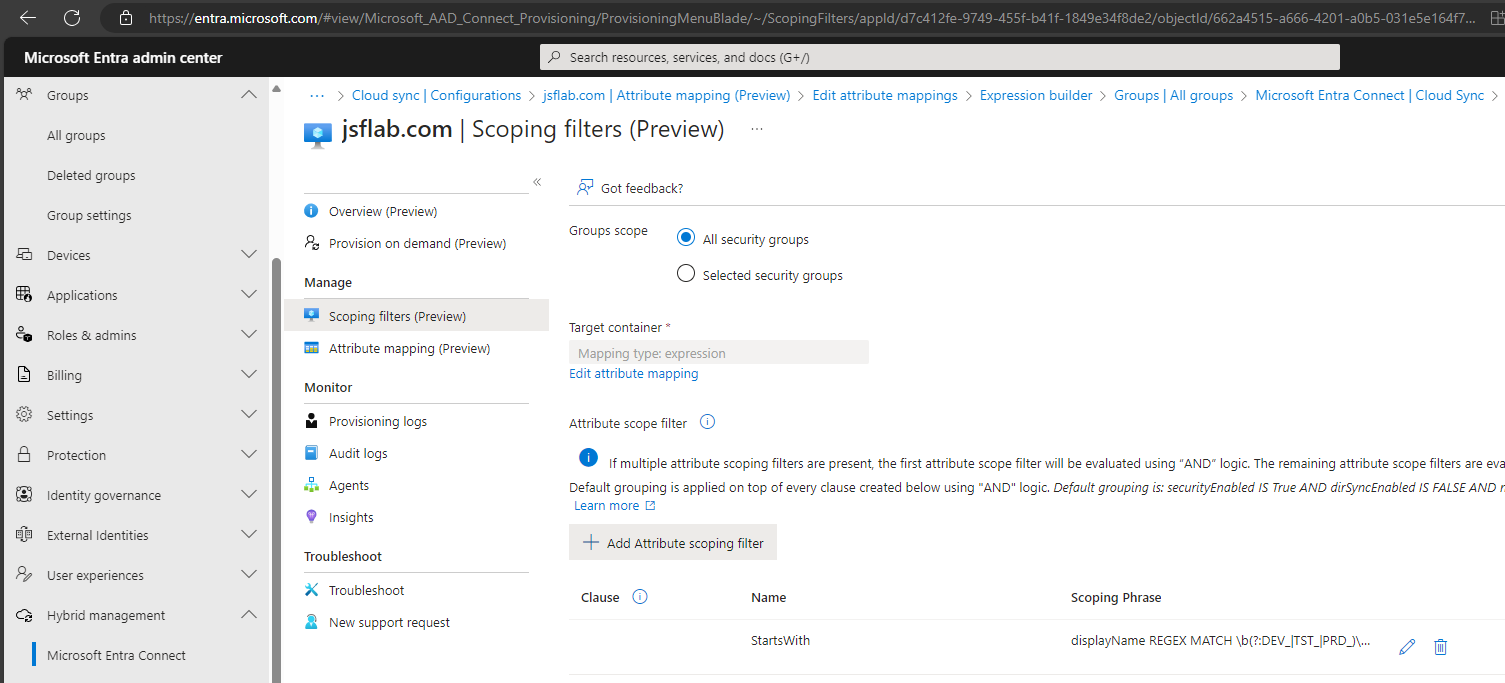
To do so just select ‘All security groups‘ in the group scope and click on ‘+ Add Attribute scoping filter’. Now you can define various filters that help you to provision just the groups you need.

Unfortunately, we can provision non mail-enabled security groups only, furthermore the preview can not handle Custom Schema Extensions, so we cannot use the extensionAttributes1-15, etc. to allow smart filtering. We need to work with the basic attributes like name and description. Conversely, this means that you need to have a solid naming concept & Entra ID group deployment in place to be able to scope accordingly.

As an example, you can use the following filter to just sync groups that match your naming convention:

Target attribute:'displayName'

Operator: 'REGEX MATCH'

Value:'\b(?:DEV_|TST_|PRD_)\w+\b'

This Regex-based filter defines that all Security Groups with a Displayname that contains Prefix 'DEV_', 'TST_'& 'PRD_' will be synced to the OnPrem AD. I used chatGPT to create the Regular Expression, which makes it easy.

You can add more filters and combine them with AND / OR Statements to make exclusions.

When you finished your filter set you’ve defined which groups will be synced to the OnPrem AD. Now let’s see how we can modify the sync itself

Attribute Mappings

You can use attribute mappings to modify the values of the group within the sync. You can compare them with the Entra Connect Synchronization Rules. There are a few default mappings that affect the canonical name, the description, and the displayname of the synced group. They help you to avoid conflicts and unsupported values.
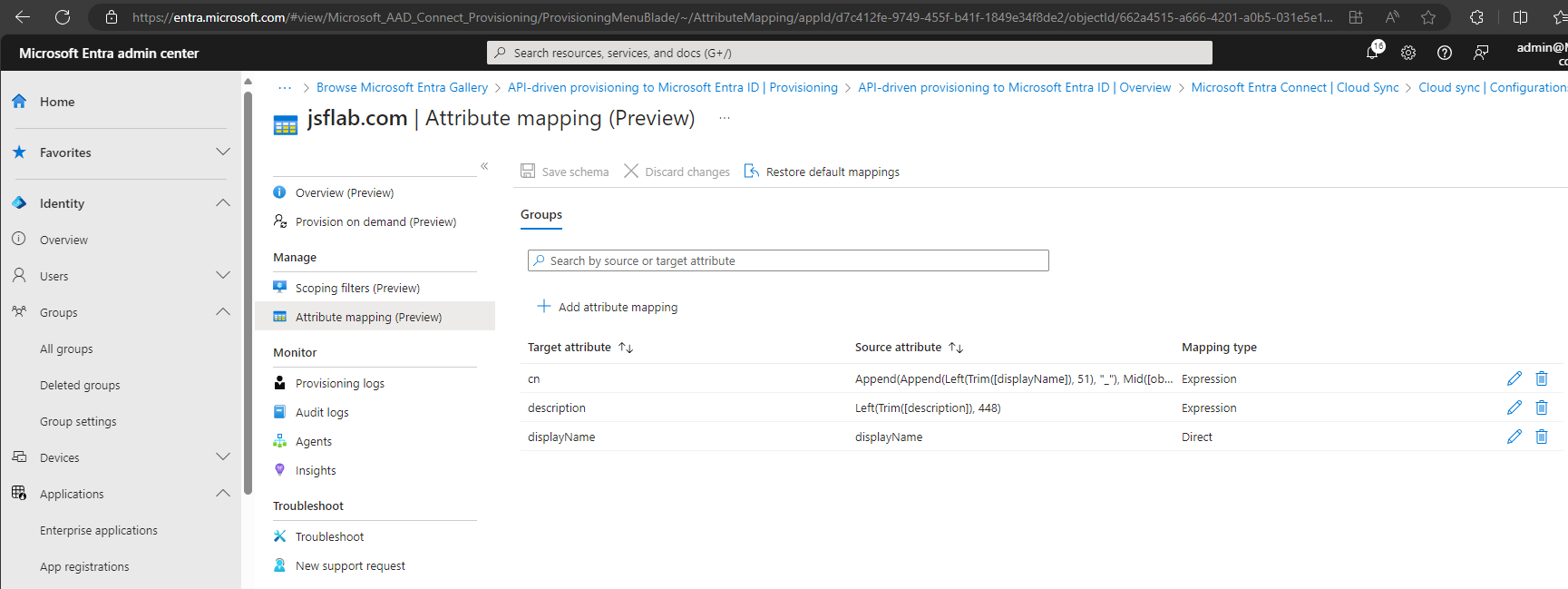
An exemplary default mapping for explanation:
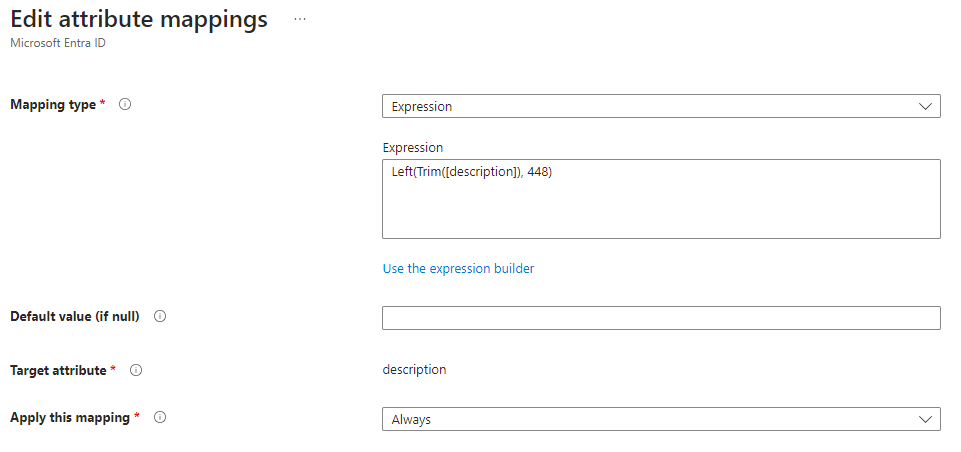
The mapping type is an Expression, which means that you can use an Expression to define the value of the provisioned group. Other possible mapping types were constant, direct that allows you to define static values, and none, which means that the target value will be equal to the source value.

The default value will be chosen if the attribute has no value in the source.

‘Apply this mapping‘ defines if this mapping will be used at the first sync only, or at every sync.

Here you can find the Microsoft Documentation which provides more details about the different choices. It’s written for the users part of Entra Cloud Sync, but it’s equal for the group handling: Attribute mapping in Microsoft Entra Cloud Sync - Microsoft Entra ID | Microsoft Learn

Now, we want to add a custom mapping with the goal of defining the distinguished Organizational Unit that should be the target for the provisioned Group. Sure, you can sync all groups easily to a static-defined OU without caring about this customization. But in real life you often need to define the OU for the authorization groups that you use OnPrem. Reasons for this could be a better overview, organization assignments, or predefined LDAP paths that were used by your apps.

To be able to define a dynamic organizational Unit assignment for the provisioned group, you create a new custom Attribute Mapping like this:
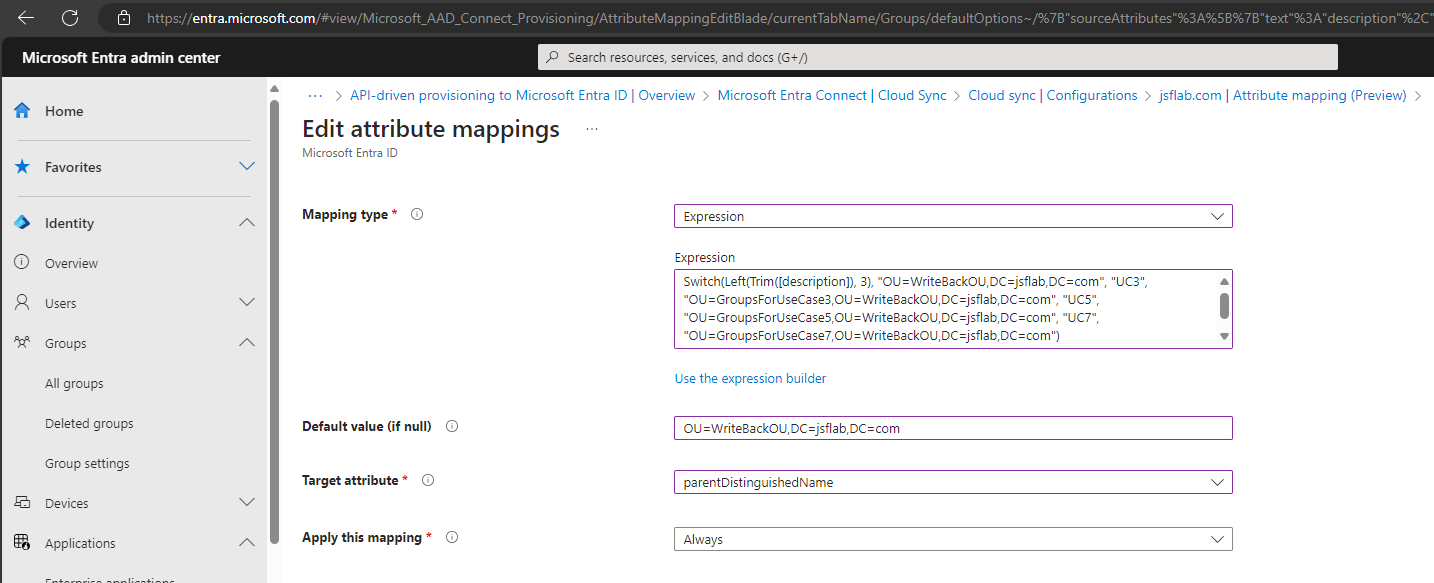
This example contains the expression:

Switch(Left(Trim([description]), 3), "OU=WriteBackOU,DC=jsflab,DC=com", "UC3", "OU=GroupsForUseCase3,OU=WriteBackOU,DC=jsflab,DC=com", "UC5", "OU=GroupsForUseCase5,OU=WriteBackOU,DC=jsflab,DC=com", "UC7", "OU=GroupsForUseCase7,OU=WriteBackOU,DC=jsflab,DC=com")

This expression uses the first 3 chars to the description attribute to define the target OU. If the Description starts with ‘UC5’, the OU will be ‘OU=GroupsForUseCase5,OU=WriteBackOU,DC=jsflab,DC=com‘ and so on.

With this scoping filter and attribute mapping in place, all groups with the displayname 'DEV_', 'TST_'& 'PRD_' will be provisioned in the OnPrem AD and their target OU will be defined by the values of the description.

Other examples for attribute mapping Expressions are:

EXAMPLE 1

Expression: Append("OU=",Append(Left(Trim([displayName]), 3), "_BackSynced,OU=WriteBackOU,DC=jsflab,DC=com"))

TestValue: [displayname] = DEV_MyLOBApp1

Expression Output: OU=DEV_BackSynced,OU=WriteBackOU,DC=jsflab,DC=com

Explanation: The OU Name will dynamically defined by the first three chars of the displayname

EXAMPLE 2

Expression: Append(Append("OU=",WORD([description],2,": _-")), ",OU=WriteBackOU,DC=jsflab,DC=com")

TestValue: [description] = DefiniedOU: ManagedByProvider1

Expression Output: OU=ManagedByProvider1,OU=WriteBackOU,DC=jsflab,DC=com

Explanation: This expression uses the second word in the description as the name of the OU

All Expressions you can use are described here: Reference for writing expressions for attribute mappings in Microsoft Entra Application Provisioning - Microsoft Entra ID | Microsoft Learn

I used simple mappings based on one attribute, but you see that the Expression can be very complex. It’s hard to write them because there are not so much examples and guides available. I’m happy that Microsoft provides an expression builder. I don’t used it for building the expressions, but to validate and debug my expressions.

So, you are able to provision & sync groups back from EntraID to the OnPrem AD. The scenarios that can be handled with this preview are limited. You definitively need a solid naming and group deployment processes in place policy to be able to use group scoping and attribute mapping. I’m excited to see how the features will be expanded. The possibility to use Graph Schema Extensions for scoping and mapping would be great for solving more complex requirements.

To learn more about group provisioning with Entra Cloud Sync you can start diving in here: Provision groups to Active Directory using Microsoft Entra Cloud Sync - Microsoft Entra ID | Microsoft Learn

manage-external-communications-in-teams
Manage external Communications in Teams
September 18, 2025
6 Minuten
Microsoft Teams
Security
Collaboration
Microsoft 365
ansatz-zum-behandeln-des-datenabflusses-bei-der-nutzung-von-m365-fr-sensible-accounts
Isolation von sensiblen Accounts in M365
January 9, 2025
10 Minuten
Identity
Security
Enterprise
Compliance
SSE
GSA
export-archiv-mailbox-content-using-ediscovery
Export Exchange Online Archiv Mailbox content using eDiscovery
September 6, 2024
6 Minuten
Compliance
Microsoft Purview
Export
Exchange Online
Archiving
PowerShell
cloning-entra-cloud-sync-jobs
Cloning Entra Cloud Sync Jobs
May 6, 2024
7 Minuten
Entra ID
PowerShell
Cloud Sync
Hybrid
Microsoft Graph API
entra-cloud-sync-group-provisioning-mappings
Entra Cloud Sync - Group Provisioning
February 21, 2024
6 Minuten
Entra ID
Active Directory
Hybrid
Identity
TIL
do-more-with-less-or-do-less-with-more
“Do more with less” or „Do less with more“?
January 10, 2024
8 Minuten
Allgemein
wie-wandle-ich-meine-sharepoint-liste-in-eine-mini-app
Wie wandle ich meine SharePoint-Liste in eine Mini-APP
July 31, 2023
4 Minuten
Citizen Development
Lists
SharePoint
shared-channels-in-microsoft-teams
Shared Channels in Microsoft Teams: So bringen wir unsere Unternehmensgruppe zusammen
April 24, 2023
7 Minuten
Allgemein
Microsoft 365
User Adoption
Entra ID
Security
Microsoft Teams
datengetriebenes-change-management
Datengetriebenes Change Management? Analyse von Nutzungszahlen und deren Aussagekraft bei der Erfolgsmessung der Digitalisierung und User Adoption
April 13, 2023
8 Minuten
Change Management
Messbarkeit
teams-inventory-implement-membership-requests
Teams Inventory – Implement Membership Requests
March 1, 2023
5 Minuten
Allgemein
Governance
Microsoft 365
Power Automate
Power Platform
SharePoint
Microsoft Teams
how-to-build-a-simple-teams-inventory
How to build a simple Teams Inventory
February 17, 2023
9 Minuten
Logic Apps
update-power-automate-dein-day-summary-flow
Update: Power Automate: Dein „Day Summary“-Flow
February 1, 2023
2 Minuten
Citizen Development
Power Automate
power-automate-dein-day-summary-flow
Power Automate: Dein „Day Summary“-Flow
January 4, 2023
2 Minuten
Citizen Development
Power Automate
tenant-to-tenant-pst-based-exchange-migration-automation-approach-part-v
Tenant-to-Tenant – PST based Exchange Migration automation approach – Part V
December 27, 2022
5 Minuten
Allgemein
Exchange Online
Microsoft 365
Migrations
PowerShell
tenant-to-tenant-pst-based-exchange-migration-automation-approach-part-iv
Tenant-to-Tenant – PST based Exchange Migration automation approach – Part IV
November 30, 2022
5 Minuten
Allgemein
Exchange Online
Microsoft 365
Migrations
PowerShell
tenant-to-tenant-pst-based-exchange-migration-automation-approach-part-iii
Tenant-to-Tenant – PST based Exchange Migration automation approach – Part III
November 25, 2022
4 Minuten
Allgemein
Azure
Exchange Online
Microsoft 365
Migrations
PowerShell
tenant-to-tenant-pst-based-exchange-migration-automation-approach-part-ii
Tenant-to-Tenant – PST based Exchange Migration automation approach – Part II
November 18, 2022
5 Minuten
Allgemein
Compliance
Exchange Online
Microsoft 365
Microsoft Purview
Migrations
PowerShell
tenant-to-tenant-pst-based-exchange-migration-automation-approach-part-i
Tenant-to-Tenant – PST based Exchange Migration automation approach – Part I
November 16, 2022
5 Minuten
Allgemein
Compliance
Exchange Online
Microsoft 365
Microsoft Purview
Migrations
PowerShell
ignite-impressionen-was-ist-neu-in-microsoft-viva
Ignite Impressionen: Was ist neu in Microsoft Viva?
October 28, 2022
5 Minuten
Employee Experience
ignite-impressionen-summary-und-persoenliches-fazit
Ignite Impressionen: Summary und persönliches Fazit zur Session „Microsoft To Do is good for your mental health!“
October 28, 2022
5 Minuten
Allgemein
Microsoft 365
Planner
To Do
ignite-impressionen-microsoft-entra-workload-identities
Ignite Impressionen: Microsoft Entra Workload Identities
October 28, 2022
4 Minuten
Microsoft 365
Entra ID
Conditional Access
Identity
Identity Governance
Identity Protection
ignite-impressionen-microsoft-syntex-die-freundliche-ki-von-nebenan
Ignite Impressionen: Microsoft Syntex – die freundliche KI von nebenan
October 28, 2022
3 Minuten
Allgemein
Microsoft 365
Governance
Information Governance
Power Automate
Power Platform
SharePoint
ignite-impressionen-uebersetzung-mit-ai-builder
Ignite Impressionen: Übersetzung mit AI Builder
October 28, 2022
3 Minuten
Allgemein
Microsoft 365
Citizen Development
Power Automate
Power Platform
SharePoint
how-to-retain-exchange-online-content-an-overview-of-the-different-compliance-options-in-microsoft-365
How to retain Exchange Online content – An overview of the different compliance options in Microsoft 365
September 28, 2022
10 Minuten
Archiving
Compliance
Governance
Retention
azure-ad-guest-governance-automation
Azure AD Guest Governance Automation
August 16, 2022
6 Minuten
Governance
Log Analytics
Logic Apps
assign-teams-app-permission-policies-to-groups
Assign Teams app permission policies to Groups(-Members)
July 1, 2022
8 Minuten
Allgemein
Microsoft 365
Governance
PowerShell
Microsoft Teams
powerautomate-prozente-in-einer-html-tabelle
PowerAutomate: Prozente in einer HTML-Tabelle
May 30, 2022
2 Minuten
Citizen Development
planner-e-mail-report-mit-aufgaben-gruppiert-nach-bucket
Planner E-Mail-Report mit Aufgaben gruppiert nach Bucket
March 31, 2022
3 Minuten
Citizen Development
sharepoint-liste-als-e-mail-uebersicht-mit-personen-feldern-und-odata-meistern
SharePoint-Liste als E-Mail-Übersicht mit Personen-Feldern (und OData meistern)
March 29, 2022
2 Minuten
Citizen Development
Power Automate
use-graph-directory-schema-extensions-for-microsoft-teams-governance
Use Graph Directory Schema Extensions for Microsoft Teams Governance
October 15, 2021
9 Minuten
Microsoft Graph API
teams-invitation-processes-a-comparison
Teams Invitation Processes - A comparison
July 8, 2021
6 Minuten
Access Packages
Compliance
Entitlement Management
Governance
Microsoft Teams
Security
use-more-access-packages
Use more Access Packages!
June 28, 2021
8 Minuten
Access Packages
Identity Governance
Compliance
Governance
Security
Microsoft Teams
microsoft-teams-fulfill-advanced-guest-access-requirements
Microsoft Teams – Fulfill Advanced Guest Access Requirements
December 4, 2020
6 Minuten
Allgemein
Entra ID
Governance
Identity Governance
Microsoft 365
Microsoft Teams
microsoft-365-language-confusion
Microsoft 365 – Language Confusion
September 30, 2020
12 Minuten
Language
another-microsoft-teams-governance-approach-using-azure-ad-identity-governance
Another Microsoft Teams Governance Approach – Using Azure AD Identity Governance
September 18, 2020
21 Minuten
Governance
Identity Governance
Microsoft Teams
planner-migration-tenant-to-tenant
Planner Migration Tenant to Tenant
July 9, 2020
3 Minuten
Migrations
Planner
PowerShell
Tenant to Tenant
flow-instant-raumbuchung
Flow: Instant Raumbuchung
February 25, 2020
2 Minuten
Citizen Development
Power Automate
modern-work-adoption
modern-workplace
ai-integrations
ai-solutions
ai-assistants
ai-solutions
ai-applications
ai-solutions
system-integration
intelligence-automation
workflow-automation
intelligence-automation
business-process-automation
intelligence-automation
intranet-solutions
digital-workplace
microsoft-365-extensions
digital-workplace
sharepoint-solutions
digital-workplace
apis-integrationen
custom-software
business-applications
custom-software
web-applications
custom-software
identity-security
security
security-monitoring
security
endpoint-security
security
endpoint-management-2
workplace
collaboration-platforms
workplace
container-platforms
platform
cloud-platforms
platform
virtualization-operations
infrastructure
server-operations
infrastructure
ai-for-modern-workplace
ai-digital-innovation
ai-security-compliance
ai-digital-innovation
aitransformation-adoption
ai-digital-innovation
ai-platforms-engineering
ai-digital-innovation
ai-strategie-und-governance
ai-digital-innovation
employee-experience
modern-workplace
workplace-security
modern-workplace
endpoint-management
modern-workplace
collaboration-productivity
modern-workplace
cyber-resillience
security-compliance-zero-trust
compliance-regulatorik
security-compliance-zero-trust
identity-access
security-compliance-zero-trust
cloud-security
security-compliance-zero-trust
zero-trust
security-compliance-zero-trust
transformation-management
cloud-transformation
change-enablement
cloud-transformation
workload-modernization
cloud-transformation
application-modernization
cloud-transformation
cloud-migration
cloud-transformation
plattformautomatisierung
cloud-plattformen-engineering
hybrid-connectivity
cloud-plattformen-engineering
plattform-engineering
cloud-plattformen-engineering
landing-zones
cloud-plattformen-engineering
cloud-foundations
cloud-plattformen-engineering
cloud-assesments
cloud-strategie-architektur
cloud-transformation
cloud-strategie-architektur
cloud-governance-und-betriebsmodell
cloud-strategie-architektur
hybrid--multi-cloud-architektur
cloud-strategie-architektur
hybrid--multi-cloud-strategie
cloud-strategie-architektur